Choosing a Swivel Office Chair involves more than matching colors with your desk. A chair may look impressive online, yet feel unstable after several hours of work. The right choice supports your posture, movement, concentration, and daily comfort. It should turn smoothly, adjust easily, and remain steady when you reach for a document or rotate toward another screen.
This guide presents 10 practical tips based on ergonomic principles, product specifications, and real workplace considerations. You will learn how to examine seat depth, lumbar support, armrest height, base construction, casters, and weight capacity. Small details matter. A seat edge pressing behind your knees can become painful by late afternoon. Hard casters may also mark wooden flooring or slide poorly on carpet.
Comfort is personal.
No single design suits everyone. Body height, working habits, desk dimensions, and health needs can change the decision. Even experienced shoppers sometimes underestimate seat firmness or overlook the return policy. I have found that a chair’s first impression can be misleading; a soft cushion is not always supportive during long sessions.
Reliable research means checking verified measurements, adjustment ranges, warranty terms, and user feedback from credible sources. It also means testing the chair, when possible, before committing. These tips will help you compare attractive features with practical performance, while recognizing that minor compromises may still be necessary. A better chair will not fix every workplace problem, but it can make daily sitting safer, steadier, and more comfortable.
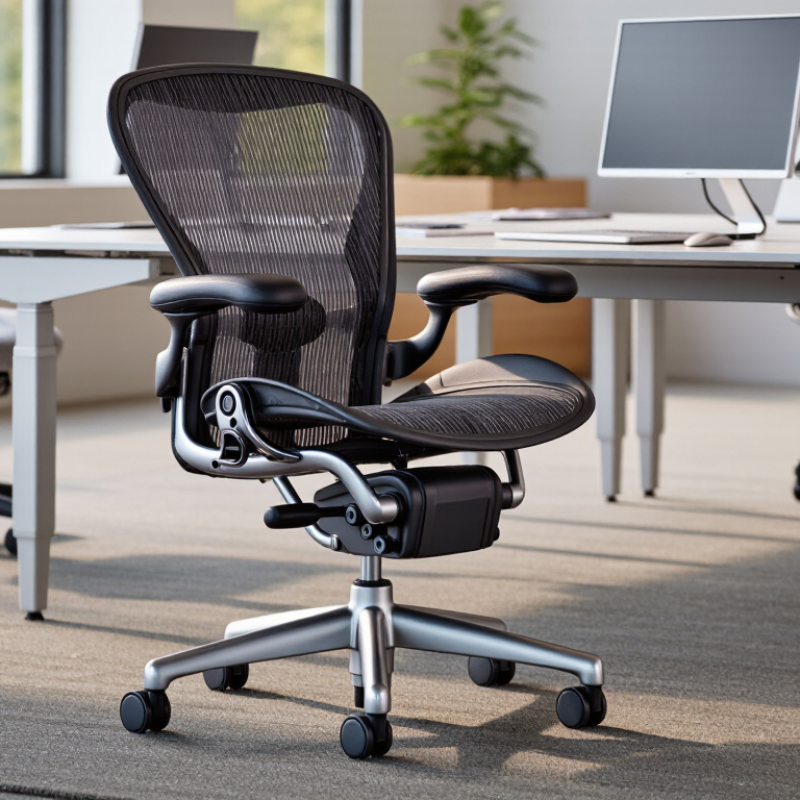
Tip 1: Track your workday before choosing a swivel office chair. Note how often you sit, stand, reach, and turn.
Tip 2: Measure your desk height and legroom. A chair that feels comfortable alone may fail under your actual desk.
Tip 3: Match the seat to your longest task. Writing, video calls, and detailed computer work create different support needs. Your habits matter more than appearance.
Tip 4: Check whether you frequently rotate for files or a second screen. Smooth swiveling can reduce awkward twisting, but it cannot correct poor desk placement.
Tip 5: Choose adjustable lumbar support if you sit for several hours. The lower back should feel supported, not pushed forward.
Tip 6: Test the seat depth. Your knees should bend freely, with a small gap behind them. This detail is easy to overlook.
Tip 7: Observe your posture after thirty minutes. Many chairs feel excellent during a five-minute showroom test.
Tip 8: Consider movement. A chair with controlled recline may suit calls, reading, and short pauses between focused tasks.
Tip 9: Review the armrests against your keyboard position. High armrests can lift your shoulders and create tension.
Tip 10: Test the chair with your real routine. Wear your usual shoes and use your normal desk if possible.
In professional seating assessments, I look for stable support, easy adjustment, and natural movement. Comfort is useful evidence, but it is not the whole decision. A soft seat may feel pleasant initially, then encourage slouching later. I have also found that users often prioritize appearance and underestimate daily reach patterns. That mistake is understandable. It is still costly. Choose for the body you use at work, not the chair you imagine using.
| Tip | Daily Work Habit | Primary Need | Useful Chair Features and Practical Targets | Why It Matters | How to Check |
|---|---|---|---|---|---|
| 1 | You work at a desk for several hours at a time. | Stable support for extended sitting. | Adjustable seat height, adequate seat depth, a supportive backrest, and a five-point base. Long-duration use | Adjustability helps the chair fit different body proportions and desk heights. | Sit for at least 10 minutes and test every adjustment. |
| 2 | You frequently turn between a monitor, documents, and another work surface. | Smooth, controlled movement. | A 360-degree swivel, a stable five-wheel base, and casters suited to the floor surface. Frequent repositioning | Swiveling can reduce repeated twisting of the torso when tasks are positioned nearby. | Rotate and roll in all directions without wobbling or excessive resistance. |
| 3 | You alternate between typing, reading, and phone calls. | Flexible posture support. | Adjustable backrest recline, tension control, and a lockable upright position. Mixed tasks | Different tasks may feel more comfortable with slightly different back angles. | Test upright and reclined positions while keeping your feet supported. |
| 4 | You type or use a mouse for most of the workday. | Neutral arm and shoulder positioning. | Height-adjustable armrests that allow relaxed shoulders and elbows close to the body. Computer work | Armrest height can affect shoulder comfort and clearance beneath the desk. | Confirm that the armrests do not prevent the chair from moving close to the desk. |
| 5 | You often sit forward while reading or completing detailed tasks. | A seat that supports movement without restricting the legs. | Appropriate seat depth, a rounded or waterfall-style front edge, and firm but comfortable padding. Forward posture | Excessive seat depth can press behind the knees or make it difficult to sit fully back. | Leave a small gap between the seat edge and the back of your knees. |
| 6 | You regularly change posture or prefer to move while working. | Controlled dynamic movement. | A recline mechanism with adjustable resistance and a backrest that follows normal movement. Active sitting | Controlled movement can make posture changes easier than a rigid backrest. | Adjust the tension so the backrest moves smoothly without pushing you forward. |
| 7 | You share the chair or work in a multi-user environment. | Fast, repeatable adjustments. | Clearly labeled controls for seat height, recline, tilt tension, and armrest position. Shared workspace | Simple controls make it easier for different users to establish a suitable setup. | Adjust the chair without leaving the seated position or using excessive force. |
| 8 | You work on carpet, hard flooring, or more than one floor type. | Safe and predictable rolling. | Casters designed for the intended floor, a stable base, and a seat that does not rock unexpectedly. Floor compatibility | Caster and floor compatibility affects movement, stability, and the risk of floor marks. | Roll, stop, and turn on the actual floor where the chair will be used. |
| 9 | You work in a warm room or sit for long uninterrupted periods. | Comfort and heat management. | Breathable back material, supportive seat cushioning, and a cover that is easy to clean. Warm environments | Material choice affects airflow, surface temperature, and day-to-day maintenance. | Check airflow, pressure distribution, and whether the material is easy to maintain. |
| 10 | You need to use the chair safely and keep it for several years. | Durability, stability, and suitable user capacity. | A clearly stated weight capacity, secure adjustment mechanisms, durable upholstery, and a stable five-point base. Long-term value | A suitable capacity and solid construction support safer, more consistent daily use. | Review the product specifications and inspect joints, controls, wheels, and base. |
Wear your usual work shoes during testing. Keep both feet flat on the floor. Your knees should sit near hip level. Small changes can matter.
Leave about two or three fingers between the seat edge and your knees. Too little space may restrict your legs. Too much space may reduce thigh support.
Adjust the support until it touches your lower back gently. It should support you without pushing your body forward. Test it while typing, not while sitting perfectly still.
Test tilt and tension separately. The backrest should recline smoothly and remain stable. It should not suddenly drop behind you. Smooth movement helps you change posture.
Your shoulders should stay relaxed. Keep your elbows close to your sides. Adjust height, width, and angle when available. Do not let the armrests lift your shoulders.
Measure your desk height, doorway width, and available floor space. Check the seat width, depth, and height. Confirm that the backrest clears your shoulders. A chair can look excellent and still fail in your room.
Try every control while seated. Swivel, recline, reach, and type. A five-minute test helps, but twenty minutes reveals more. It still cannot copy a full workday.
Match the stated capacity to your body weight, clothing, and movement. Look for a five-point base and stable casters. The chair should not wobble during ordinary reaching. Specifications are useful, but they are not the whole answer.
Read the coverage carefully. Some warranties exclude fabric, casters, lifting parts, or labor. Ask whether replacement parts remain available. A return window may matter more than impressive specifications.
Yes. Firm padding may feel supportive on the first day. After long writing, it may pressure your thighs. I once trusted cushioning too quickly. I would test longer now.
Choosing the right Swivel Office Chair starts with understanding your primary needs, work habits, and the amount of time you spend sitting each day. Look for adjustable seat height, tilt tension, lumbar support, and armrests so the chair can be customized to your body and workstation. Seat cushioning, backrest shape, and breathable materials also play an important role in maintaining comfort and supporting good posture during long working hours.
You should also compare the chair’s construction, upholstery, base stability, wheels, and smooth swivel movement. Make sure its dimensions and weight capacity suit the intended user and available space. Finally, review the warranty, maintenance requirements, and overall value rather than focusing only on the initial price. A well-chosen chair should provide reliable support, comfortable movement, and lasting performance while fitting naturally into your daily work routine.

 YIKE
YIKE